Laser cutting with CorelDRAW - CamDRAW®
Turn your CorelDRAW designs into precise laser projects with CamDRAW — the CorelDRAW software for laser cutting and laser engraving.
Use CamDRAW® to quickly and easily create laser jobs from your vector graphics. Whether laser cutting or laser engraving, the CorelDRAW plugin creates ready to use files for your laser. As integrated Corel laser software, CamDRAW® generates optimized motion and power parameters for precise 2D applications. CorelDRAW laser software enables a clear, reproducible workflow without external CAM programs.


Laser projects directly in CorelDRAW
Create laser projects without leaving CorelDRAW. Design and prepare cutting and engraving jobs directly from the familiar CorelDRAW user interface.
Laser movements with preview
CamDRAW supports laser cutting and laser engraving and offers automatic optimization of laser movements. Processes, sequences, and parameters can be checked in advance and controlled via a visual preview before laser projects are created.
Parameter management & database
Define and manage different laser parameters such as power, speed, or passes centrally in one place. CamDRAW enables the flexible use of multiple parameter sets within a project - for cutting and engraving without manual reworking.
Material and project settings
Customize material and project settings for each laser job individually and save reusable project files directly in CorelDRAW. This allows you to efficiently prepare recurring cutting and engraving projects and implement them consistently.
Automatic optimization of laser movements
Intelligent planning of laser movements reduces unnecessary travel distances and optimizes the laser cutting and engraving process. This shortens processing times and achieves consistent cutting results.
Rotational applications
The CorelDRAW laser plugin supports rotational applications for laser processing, such as cylindrical workpieces. Rotational movements can be integrated into the laser workflow to prepare engravings on round objects in a controlled manner.
CorelDRAW Laser Cutting - CamDRAW®

Successfully used by our customers in
Signage industry
Advertising technology
Printing and graphic industry
Furniture construction
Trade fair and exhibition construction
Jewelry making
Lettering and engraving
Laser-based manufacturing of components
Laser cutting of materials
Model making
Features for laser cutting in CorelDRAW
Create laser projects directly in CorelDRAW
With the CorelDRAW laser software, you can create laser projects directly in CorelDRAW without leaving your familiar drawing workflow. Simply select the desired vector objects and define the appropriate laser operations for laser cutting or laser engraving. CamDRAW supports different types of processing and enables the structured preparation of cutting and engraving jobs within CorelDRAW - without additional CAM software.
Sheet and project settings in CamDRAW®
CamDRAW supports you in setting up and managing CorelDRAW documents for laser projects. Sheet parameters such as width, height, and origin can be set directly and adapted to the requirements of laser cutting and laser engraving. If no document is open, CamDRAW automatically creates a new CorelDRAW sheet with the defined dimensions - as a basis for structured and reproducible preparation of laser projects.
Contour processing in the CorelDRAW Laser Plugin
CamDRAW supports contour processing for laser projects directly in CorelDRAW. Both closed and open vector curves can be used for laser cutting or laser engraving. The laser can be guided on, inside, or outside the contour, depending on the desired result. Additional settings such as contour offset or passes allow flexible adaptation to different materials and applications.
Surface processing in the Corel Laser Plugin
The CorelDRAW laser cutting software enables surface processing for applications within closed vector contours. Areas can be processed specifically within shapes, text, or combined objects - for example, for flat laser engraving or structured laser applications. Even complex contours with inner surfaces and recesses are correctly taken into account. Processing is structured and traceable, so that surfaces can be prepared evenly and reproducibly.
Entries and exits in laser cutting (Leads)
CamDRAW allows you to define specific entries and exits in laser cutting applications. Start and end points can be set independently of each other, so that entries can be used and exits can be deactivated as needed. Entries and exits can be linear or tangential to the contour. This allows you to optimize the start of the cut and reduce visible starting points in laser projects.
Material bars for laser cutting
CamDRAW supports material bars and taps for laser cutting applications to hold cut parts securely in the material during the cutting process. Targeted interruptions in the contour leave small bridges in place so that components remain fixed until cutting is complete, preventing slippage. Material bridges can be placed flexibly and can be combined with entries and exits to enable a controlled and clean cutting process.
Centralized management of laser settings
The Corel laser software offers centralized management of laser settings directly in CorelDRAW. Cutting and engraving parameters such as power, speed, and passes can be clearly defined, saved, and reused. The stored settings are available for different laser cutting and engraving processes and can be selected on a project-specific basis. This allows projects to be prepared consistently without having to redefine settings each time.
Automatic optimization of laser processes
CamDRAW automatically optimizes laser cutting and laser engraving processes. Cutting and engraving paths are arranged in such a way that unnecessary movements are reduced, regardless of the order in which the vectors were created in CorelDRAW. This allows laser projects to be prepared efficiently and processing times to be shortened without changing the usual drawing workflow.
Support for rotating applications
CamDRAW supports rotating laser applications as an extension to classic flat processing. Rotation-based projects can be prepared within the CorelDRAW workflow without changing the usual drawing process. Implementation is flexible and application-oriented, so that even more complex laser projects on rotating workpieces can be prepared in a structured manner.
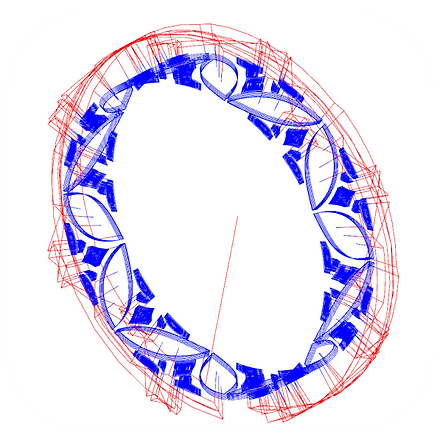
Visual preview of laser processes
CamDRAW offers a visual preview of the prepared laser processes directly in CorelDRAW. Cutting and engraving paths can be checked in advance to verify the sequence, transitions, and settings. In addition, nodes and control points of the vector curves can be displayed. This allows you to maintain control over the curve quality and the preparation of your laser cutting and laser engraving projects at all times.
Work in parallel and save projects in CamDRAW®
All settings and project parameters made in CorelDRAW Laser Cutting Software are directly linked to the respective CorelDRAW document (CDR). These include settings for laser cutting and laser engraving, material and project settings, and prepared laser sequences. This allows you to easily switch between multiple open CorelDRAW documents or reopen projects at a later time. When saving via “Save” or “Save As,” all associated laser information is stored in the CDR document and is immediately available the next time you open it.
Support for numerous laser systems
CamDRAW is designed for use with different laser systems and supports a wide range of machines, from compact desktop lasers to more powerful laser machines. The software can be flexibly adapted to different requirements and allows laser cutting and laser engraving projects to be prepared directly in CorelDRAW. Created laser projects can be output in standardized formats (G-code) as needed to ensure high compatibility with different laser setups.